


Azure AD B2C does not let you export user passwords. Neither does Microsoft Entra ID. Microsoft Graph API returns user profiles, attributes, group memberships, and identity provider links — but never the password hash. This is not a missing feature or an API gap; it’s a deliberate security boundary, and it applies whether you’re moving off B2C because of the platform’s retirement timeline or simply switching CIAM vendors.
That constraint shapes everything about how a B2C-to-another-CIAM migration has to work. This article walks through the two viable migration patterns — lazy migration with a final export, and straight bulk export with forced reset — and then addresses the part that breaks both of them if you don’t plan for it: multi-factor authentication.
We’ll reference the relevant Azure B2C and Microsoft Graph endpoints and describe what each CIAM vendor’s capabilities need to support, without walking through full implementation code — this is a pattern and decision-making guide, not a tutorial for one specific stack.
Need a hand with the migration itself? CerberAuth offers migration services.
Get migration helpWhy the Password Can’t Be Exported
Password hashes in Azure AD B2C are stored using Microsoft’s internal hashing scheme and are never surfaced through any supported API — not Microsoft Graph, not the legacy Azure AD Graph API, not the B2C tenant export tooling. This holds true for both local accounts (email/username + password) and is consistent with how virtually every major identity provider treats credential material: OIDC, SAML, and SCIM all standardize identity data exchange, but none of them standardize credential exchange, because doing so would defeat the purpose of one-way hashing.
The practical consequence: any migration plan that assumes “export users, then import them with their existing password” is a non-starter. You have exactly two credible strategies left.
Option 1: Lazy Migration Using Azure B2C Endpoints, With a Final Export
Lazy migration (sometimes called “migrate on login”) avoids forcing every user to reset their password on day one. Instead, you run both systems in parallel for a transition window, and each user gets migrated individually the next time they log in.
The endpoints involved
Profile and attribute export (no credentials):
- Microsoft Graph
GET /users— retrieves user profile attributes: display name, email, customextension_attributes, identity provider references - Microsoft Graph
GET /users/{id}/identities— retrieves linked local and federated identities (email/username, social IdP links) b2cIdentityUserFlowAttributes— retrieves custom attribute schema definitions configured in your B2C user flows, needed to correctly map custom attributes into the target CIAM’s schema
None of these endpoints return a password or password hash, by design.
Credential verification at login:
- Authorization Code flow against the B2C tenant’s OIDC endpoints (
/oauth2/v2.0/authorize,/oauth2/v2.0/token) — the standard, MFA-compatible way to confirm a user’s password is correct, by having them actually complete an interactive login against B2C - Resource Owner Password Credentials (ROPC) grant (
/oauth2/v2.0/tokenwithgrant_type=password) — a legacy, non-interactive alternative that lets your backend verify a password directly without a redirect. This only works for accounts with no MFA and no Conditional Access policy blocking non-interactive flows — more on this in the MFA section below.
The architecture
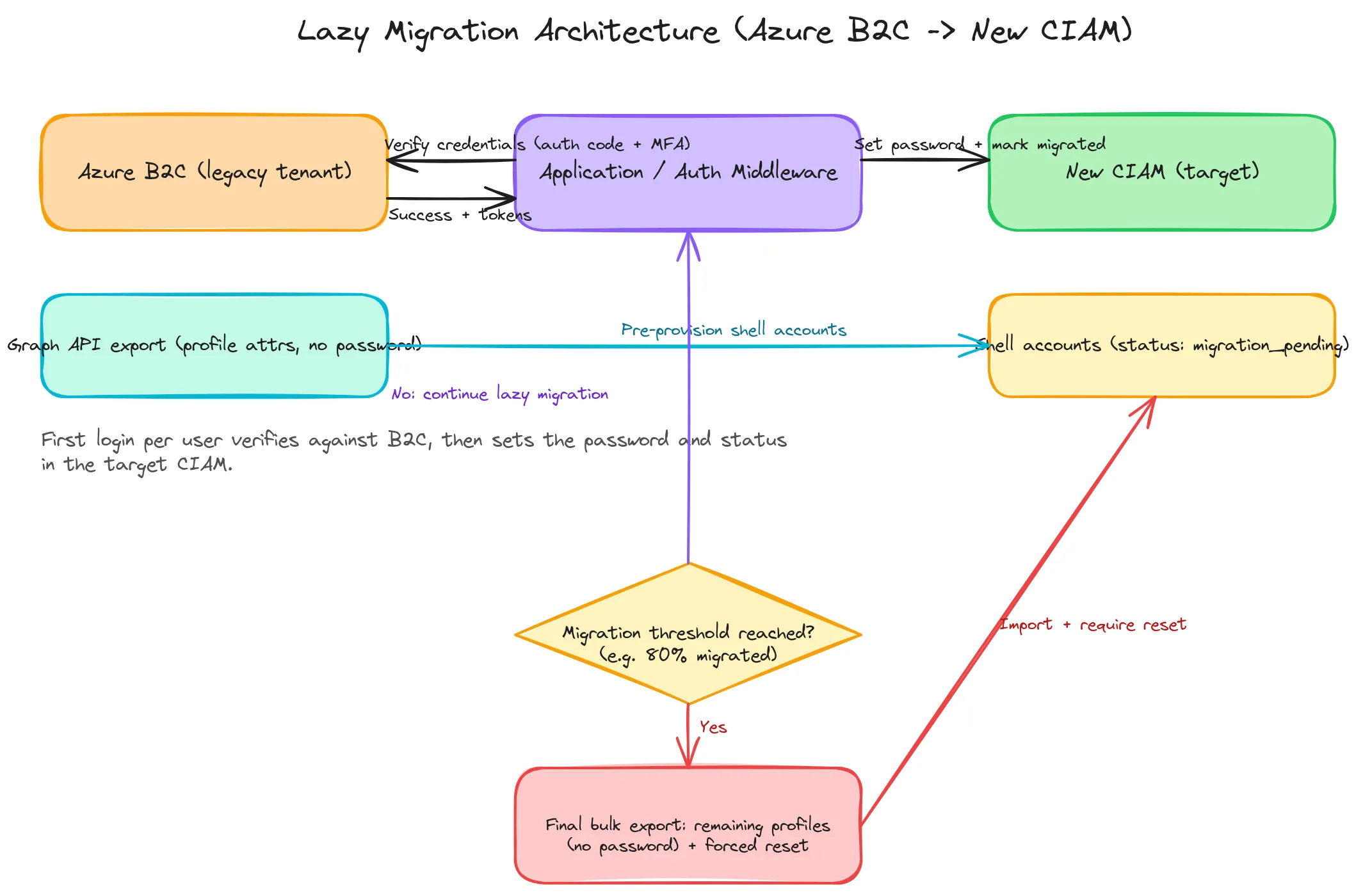
The migration runs two systems side by side for a bounded period:
- Pre-provision shell accounts
Import every user profile into the target CIAM using the Graph API export. Each account gets the correct attributes, email, and a status flag such as
migration_pending— but no usable password yet. - Keep auth pointed at both systems
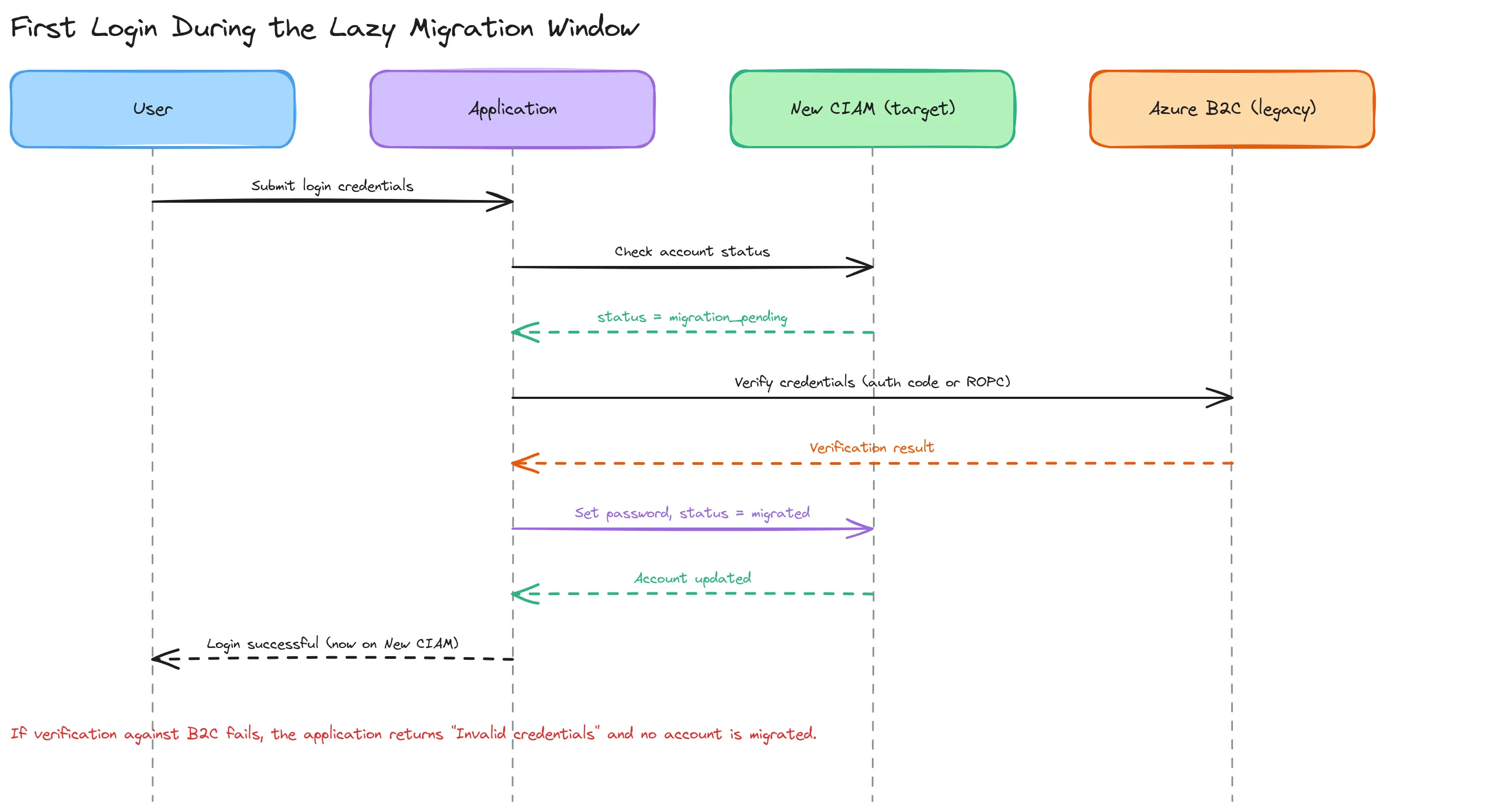
On login, first check whether the user’s account in the target CIAM has already completed migration. If not, fall through to verifying credentials against B2C.
- Verify credentials against B2C
At the moment of login, verify via the Authorization Code flow or ROPC, depending on the user’s MFA status (see the MFA section below).
- Set the password and mark migrated
On successful verification, set the confirmed password in the target CIAM and flip the account’s status to
migrated. From that point on, that user authenticates directly against the new CIAM — B2C is no longer in their path. - Track migration coverage over time
Active users get migrated naturally within days or weeks. Inactive users won’t touch this path at all — which is exactly why the next step exists.
- Trigger a final export once coverage plateaus
Typically once 70–90% of your monthly active users have been migrated and the growth curve has flattened. Run one last Graph API bulk export of everyone still unmigrated, import their profiles (without a password) into the target CIAM, and force a password reset for that remaining cohort specifically.
This bounds your dependency on the old tenant: you’re not waiting indefinitely for 100% organic migration, and you’re not forcing a reset on your most active users, who are the ones least tolerant of that friction.
Sequence: first login during the lazy migration window
The final export phase
Once you decide to close out the lazy migration window, the remaining step is a straight bulk export — the same Graph API calls (GET /users, GET /users/{id}/identities), run once against whatever cohort is left. There’s no verification-at-login step for this group because, by definition, they haven’t logged in during the transition window. Import their profiles into the target CIAM with an unusable placeholder password and route them to a forced reset on next login — which is exactly Option 2 below, scoped down to a smaller, known population.
Option 2: No Lazy Migration — Straight Bulk Export With Forced Reset
If your active-user base is small relative to your total user count, if your application doesn’t tolerate running two auth systems in parallel, or if you simply want a hard cutover date, skip lazy migration entirely.
The endpoints involved
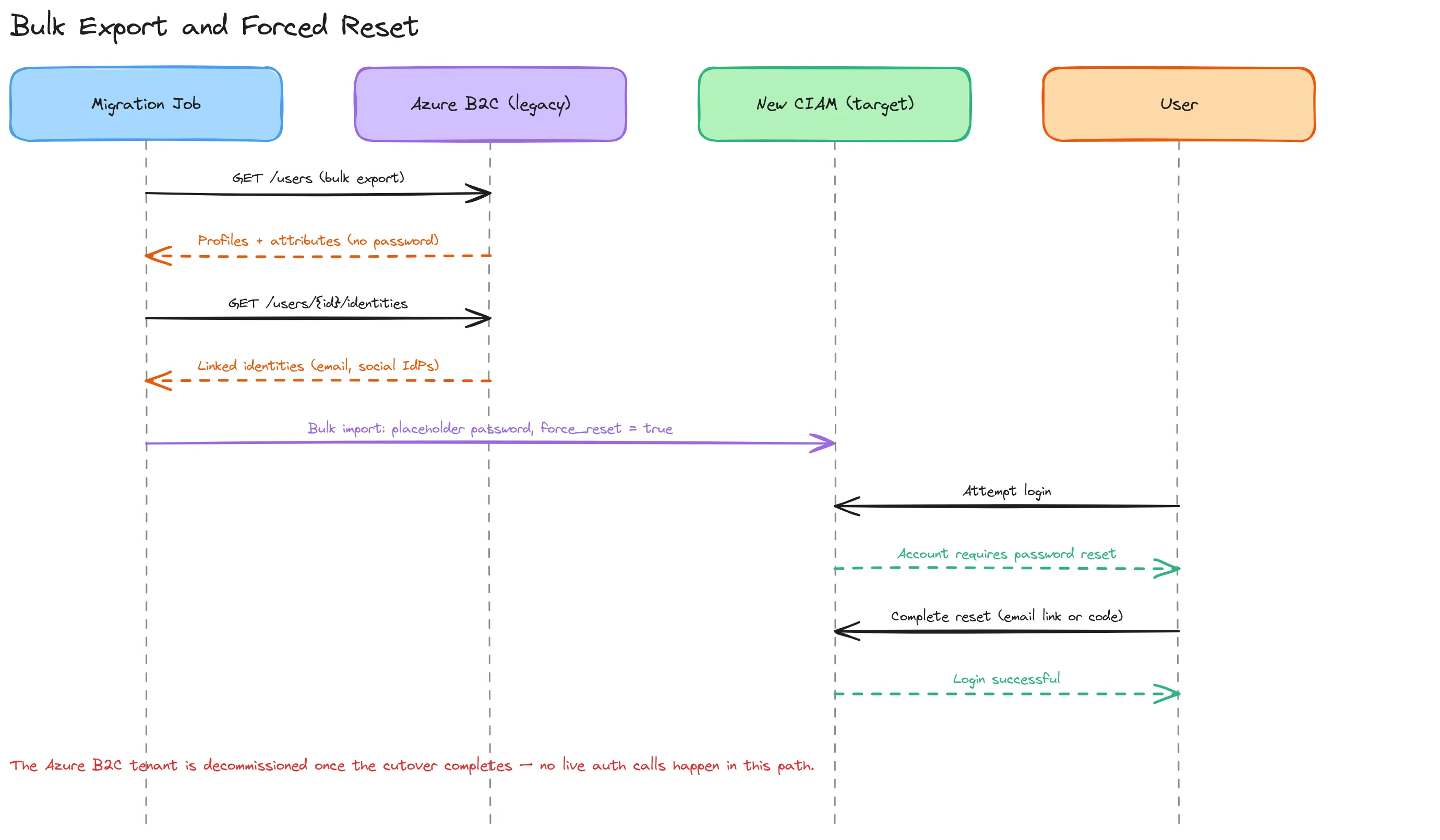
Only the profile/attribute export endpoints are needed:
- Microsoft Graph
GET /users - Microsoft Graph
GET /users/{id}/identities b2cIdentityUserFlowAttributesfor custom attribute schema mapping
No B2C authentication endpoint is called at any point — because no live verification against B2C happens, this path is entirely decoupled from B2C’s auth stack, including its MFA configuration.
Sequence: bulk export and forced reset
When this is the better trade-off
- Your user base is largely dormant, and the engineering cost of running a dual-auth verification path for a handful of active users isn’t worth it.
- You need a fixed, auditable cutover date rather than an open-ended migration tail.
- Your B2C tenant has heavy custom policy (Identity Experience Framework) usage that would be expensive to keep alive and secure for an extended lazy-migration window.
- Your target CIAM or compliance posture benefits from a hard credential reset event — some organizations use a platform migration as a deliberate opportunity to enforce stronger password policies across the board.
The cost is conversion: expect a real percentage of users to abandon the reset flow rather than complete it, particularly for lower-engagement products. Plan your comms (email, in-app banners, support capacity) accordingly.
How to Deal With MFA
MFA is where both migration paths get harder, and it deserves its own analysis because it breaks the verification step specifically — not the export step, which is unaffected either way.
Why ROPC breaks under MFA
The ROPC grant (grant_type=password) is a single round-trip: username and password go in, a token comes out. There’s no channel in that exchange for a second factor. If the user has MFA enrolled, or if any Conditional Access policy on the tenant requires MFA for non-interactive or legacy-auth flows, ROPC fails outright — typically with an AADSTS50076 or AADSTS50079-class error — rather than prompting for the second factor. Microsoft’s own documentation is explicit that ROPC is not compatible with these scenarios, and it’s also a flow Microsoft has been steadily restricting and deprecating across the wider Entra/Azure AD stack, independent of B2C specifically.
Segment your users before choosing a verification method
Before finalizing either migration path, pull a data-driven view of MFA coverage using Graph API’s authentication methods and credential registration reporting endpoints. You need to know, concretely:
- What fraction of your active users have MFA enrolled at all
- Whether Conditional Access policies enforce MFA universally, or only for specific applications, networks, or risk levels
- Whether any of your currently allowed sign-in flows are exempt from those policies (a common source of ROPC still working for a subset of otherwise-MFA users)
This segmentation is the deciding input for the rest of the design — don’t guess at MFA coverage, measure it.
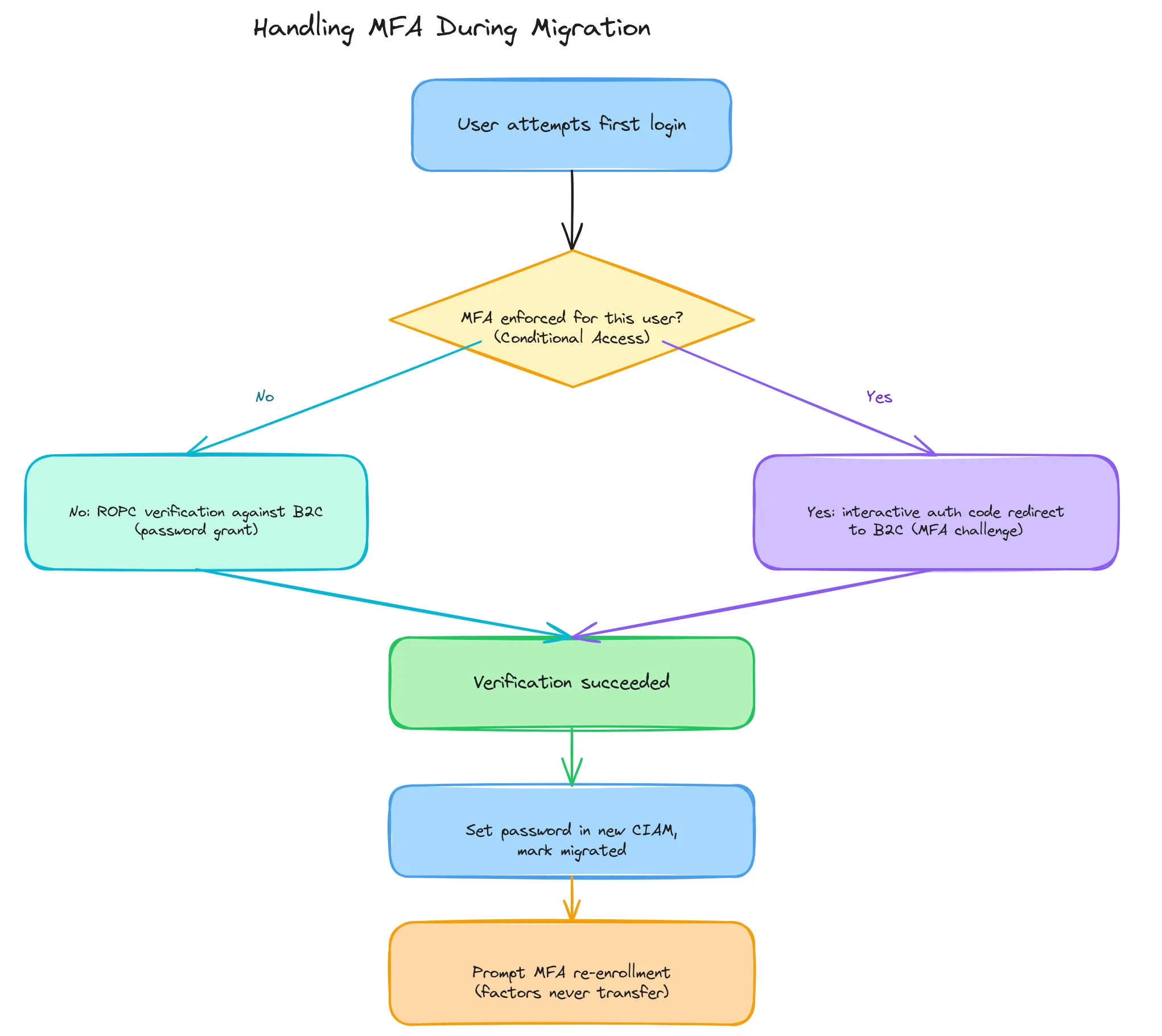
The two verification paths, branched by MFA status
- No MFA enforced: ROPC is viable — a single non-interactive backend call verifies the password with no user-facing redirect. This is the lowest-friction option where it’s available.
- MFA enforced: Route the user through the Authorization Code flow instead — a full interactive redirect to B2C’s hosted login, where the user completes their existing MFA challenge exactly as before. Treat a successful completion of this flow as your verification signal, exactly as you would a ROPC success, and proceed to set the password in the target CIAM.
A simpler variant, if your application’s UX tolerates one extra redirect on first login: use the Authorization Code flow universally, for both MFA and non-MFA users. This sidesteps ROPC’s restrictions and deprecation trajectory entirely and gives you one verification code path instead of two. The only reason to keep ROPC in the mix is if a fully silent, redirect-free verification matters to your UX for the non-MFA segment.
MFA enrollment doesn’t migrate either
This is easy to miss: even for users who are successfully verified and migrated, their MFA enrollment — TOTP secrets, registered phone numbers, WebAuthn/passkey credentials — does not transfer to the new CIAM. Microsoft doesn’t export this data any more than it exports passwords, and even if it did, most target CIAM platforms couldn’t import a foreign TOTP seed or FIDO2 credential directly. Budget for MFA re-enrollment as a mandatory, separate step immediately after password migration — not something that rides along with it for free. Flagging the migrated account as “MFA setup required” at next login, before granting full access, is the safest way to enforce this rather than leaving it optional.
Comparison Summary
| Lazy migration + final export | Straight bulk export + forced reset | |
|---|---|---|
| User friction | Low for active users; reset only for the long tail | Universal — every user resets |
| Engineering effort | Higher — dual-system auth logic, status tracking | Lower — one-time export/import job |
| B2C tenant lifetime | Extended, until coverage plateaus | Short — decommission immediately after export |
| Cutover date | Open-ended, coverage-driven | Fixed and auditable |
| MFA handling | Needs branch logic (ROPC vs. auth code) | Irrelevant — no B2C auth call happens |
| Best fit | Large, actively-engaged user bases; UX-sensitive products | Small or dormant user bases; hard compliance deadlines |
A Reminder About Azure AD B2C Deprecation
This migration question is increasingly not optional. Microsoft’s published timeline:
- May 1, 2025 — End of sale. New customers can no longer purchase Azure AD B2C, and no new tenants can be created outside existing agreements.
- March 15, 2026 — Azure AD B2C Premium P2 (Identity Protection) is retired for all customers, including existing tenants.
- At least May 2030 — Microsoft’s stated end of support for remaining Azure AD B2C P1 tenants. Security patches and SLAs continue until then, but the platform is in maintenance mode: no new features will ship.
If you haven’t yet decided where you’re migrating to, see our companion piece on what to do next after Azure AD B2C’s retirement announcement for a vendor-by-vendor comparison. This article assumes that decision is made and focuses specifically on the credential-migration mechanics that apply regardless of which CIAM you land on.
Closing Notes
The core constraint — no password export, ever, from any major identity provider — means every migration strategy has to substitute a verification step for an export step. Lazy migration verifies at login, at the cost of running two systems in parallel. Bulk export with forced reset skips verification entirely, at the cost of universal user friction. MFA adds a branch to whichever path you choose, and re-enrollment is a separate cost either way.
None of this is Azure B2C-specific — the same shell-account-plus-verify-on-login pattern applies to any CIAM-to-CIAM migration where the source platform (correctly) refuses to export credentials. Azure AD B2C’s retirement timeline just makes it the most immediate version of this problem for a large number of teams right now.
Planning an Azure AD B2C migration and want an experienced team to handle it? CerberAuth offers migration services, from choosing the target CIAM to cutover.
Talk to us about your migration