


If you’ve enabled refresh token rotation and started seeing users get logged out with no clear cause — especially after network hiccups, multiple open tabs, or devices waking from sleep — you’re probably not looking at an attack. You’re probably looking at your own client racing against itself, and your authorization server correctly (but unhelpfully) treating that race as a possible replay.
This is one of the most common integration problems teams run into after turning rotation on, and it’s rarely covered honestly: most guides explain why rotation is good security and stop there, leaving you to debug the fallout on your own. This article is about that fallout — what’s actually happening, how to tell it apart from a real security incident, and concrete fixes for SPAs, mobile apps, and traditional server-rendered applications using cookies.
Quick refresher: what refresh token rotation actually does
A refresh token is a long-lived credential your client uses to obtain new access tokens without forcing the user to log in again. Access tokens are short-lived (often 15–60 minutes); refresh tokens can live for days or weeks.
Rotation changes one thing: instead of a refresh token staying valid for its entire lifetime, each use consumes it. Every time the client calls the token endpoint, the authorization server issues a new access token and a new refresh token, and invalidates the one that was just used.
The baseline behavior for refresh tokens comes from RFC 6749 §6, which already lays the groundwork for expiration, revocation, and rotation. The current, authoritative guidance on how to do this securely is RFC 9700, OAuth 2.0 Security Best Current Practice (BCP 240, January 2025). Its Section 4.14.2 states the recommendation directly:
Refresh token rotation: the authorization server issues a new refresh token with every access token refresh response. The previous refresh token is invalidated, but information about the relationship is retained by the authorization server.
Why rotation exists
Without rotation, a refresh token is a long-lived, indefinitely reusable credential. If one is exfiltrated, an attacker can mint fresh access tokens for as long as the refresh token remains valid — often weeks. RFC 9700 §4.14.1 puts it plainly: refresh tokens are an attractive target precisely because they represent the full scope of access granted to a client and aren’t constrained to a specific resource. An attacker who exfiltrates and replays one can mint access tokens and act on behalf of the resource owner indefinitely.
Rotation closes that gap and gives the authorization server a detection signal it didn’t have before. Here is the mechanism as the BCP actually describes it, worth reading closely because the precision matters:
If a refresh token is compromised and subsequently used by both the attacker and the legitimate client, one of them will present an invalidated refresh token, which will inform the authorization server of the breach. The authorization server cannot determine which party submitted the invalid refresh token, but it will revoke the active refresh token. This stops the attack at the cost of forcing the legitimate client to obtain a fresh authorization grant.
Two things worth noting in that text, because they get flattened in a lot of secondary write-ups:
- The server cannot tell attacker from legitimate client. It sees two presentations of an invalidated token and has no way to know which one was malicious. This is exactly why races caused by your own application look identical to theft from the server’s point of view.
- The BCP describes revoking “the active refresh token,” not a dramatic, unconditionally sweeping wipe of every credential the user has ever held. Implementations vary in how broadly they revoke — some invalidate the whole chain of descendants from a grant, others are narrower — but the RFC’s own language is more measured than “nuke everything” framing you’ll see elsewhere. Check your specific provider’s documentation for what actually happens on their end when reuse is detected, rather than assuming a specific blast radius.
That detection mechanism is exactly what’s probably logging your users out.
Why “reuse” fires against your own legitimate traffic
Rotation assumes a clean, sequential handoff: use token A, get token B, discard token A, repeat. Real applications don’t behave that cleanly, and every deviation from that sequence can look, to the authorization server, indistinguishable from theft.
Concurrent refresh calls. Two parts of your application — two tabs, a background sync process and a foreground request, two devices — notice an expired access token at close to the same moment and independently call the token endpoint with the same refresh token. The server can only honor one of these.
The response that never arrives. The client sends a valid refresh token. The server rotates it successfully — invalidates the old one, generates a new one — but the response never reaches the client: dropped connection, app backgrounded mid-request, process killed. The client is left holding a refresh token that’s already dead server-side, with no way to distinguish this from “the request never reached the server at all.”
Independent processes, no shared state. Anything with more than one place tokens get refreshed from, without those places coordinating, will eventually race.
None of these require an attacker. They’re the actual, unglamorous cause behind most “why did this user get logged out” tickets once rotation is turned on — and the fix looks different depending on what kind of application you’re running.
How to tell a real attack from a false positive
Before assuming every reuse event is a bug in your own client:
- Timing: A legitimate race typically produces reuse within milliseconds to a few seconds of the original refresh. An attacker replaying a token captured earlier tends to produce a longer, less tightly clustered gap.
- Origin: If you log IP address, user agent, or device fingerprint on refresh requests, a race from your own client shows the same context on both sides. A stolen-token replay usually shows a different one.
- Frequency: Occasional reuse errors correlated with known conditions (flaky network, multiple tabs) suggest races. A sustained pattern across many users, or repeated reuse on a single account over time, is a stronger signal of actual compromise.
You don’t need a full anomaly-detection system to benefit from this — logging enough to eyeball the pattern after the fact will tell you quickly whether you have an integration bug or a security incident.
Fixing the false positives, by application type
The right fix depends heavily on where your refresh token lives and how many places can try to use it concurrently. The core idea is the same everywhere — serialize access to the refresh token so only one refresh is ever in flight — but the mechanism differs.
Single-Page Applications (SPA)
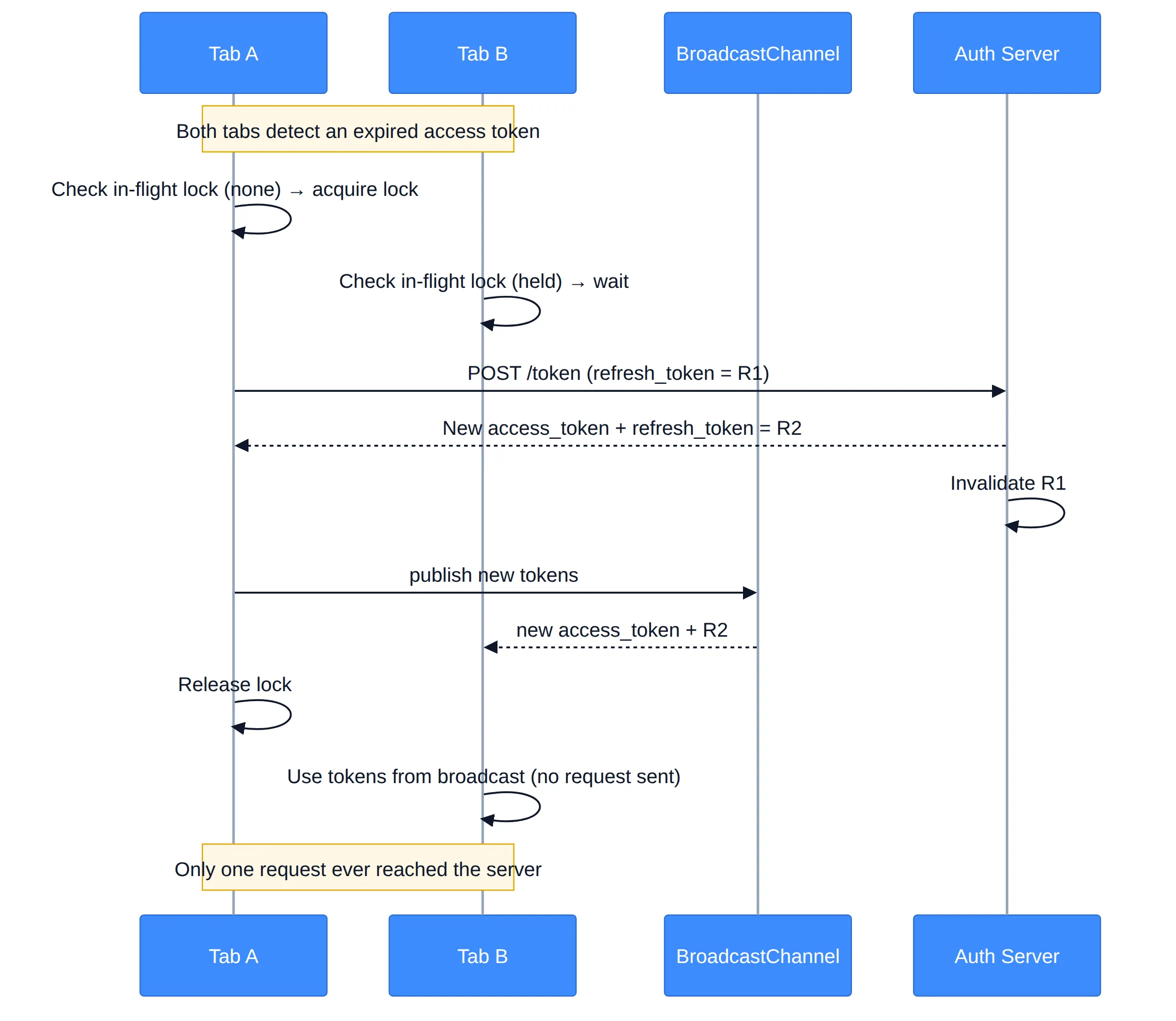
In a browser SPA, the refresh token (or the session that implies one, if you’re using a Backend-for-Frontend) is shared across every open tab and every concurrent API call within a tab. This is the environment where races are most common, because nothing stops two tabs from waking up and refreshing at the same instant.
The fix has two layers:
- Single-flight lock per tab. Any code path that needs a token — a 401-triggered retry, a proactive refresh before expiry — should check for an in-flight refresh promise and await it instead of starting a new request. This is a shared promise/mutex pattern, standard in mature auth SDKs.
- Cross-tab coordination. A lock inside one tab doesn’t stop a different tab from racing it. Use
BroadcastChannel(or astorageevent listener as a fallback) so that when one tab completes a rotation, sibling tabs receive the new token instead of attempting their own refresh with one that’s about to be superseded.
Mobile applications (native iOS / Android)
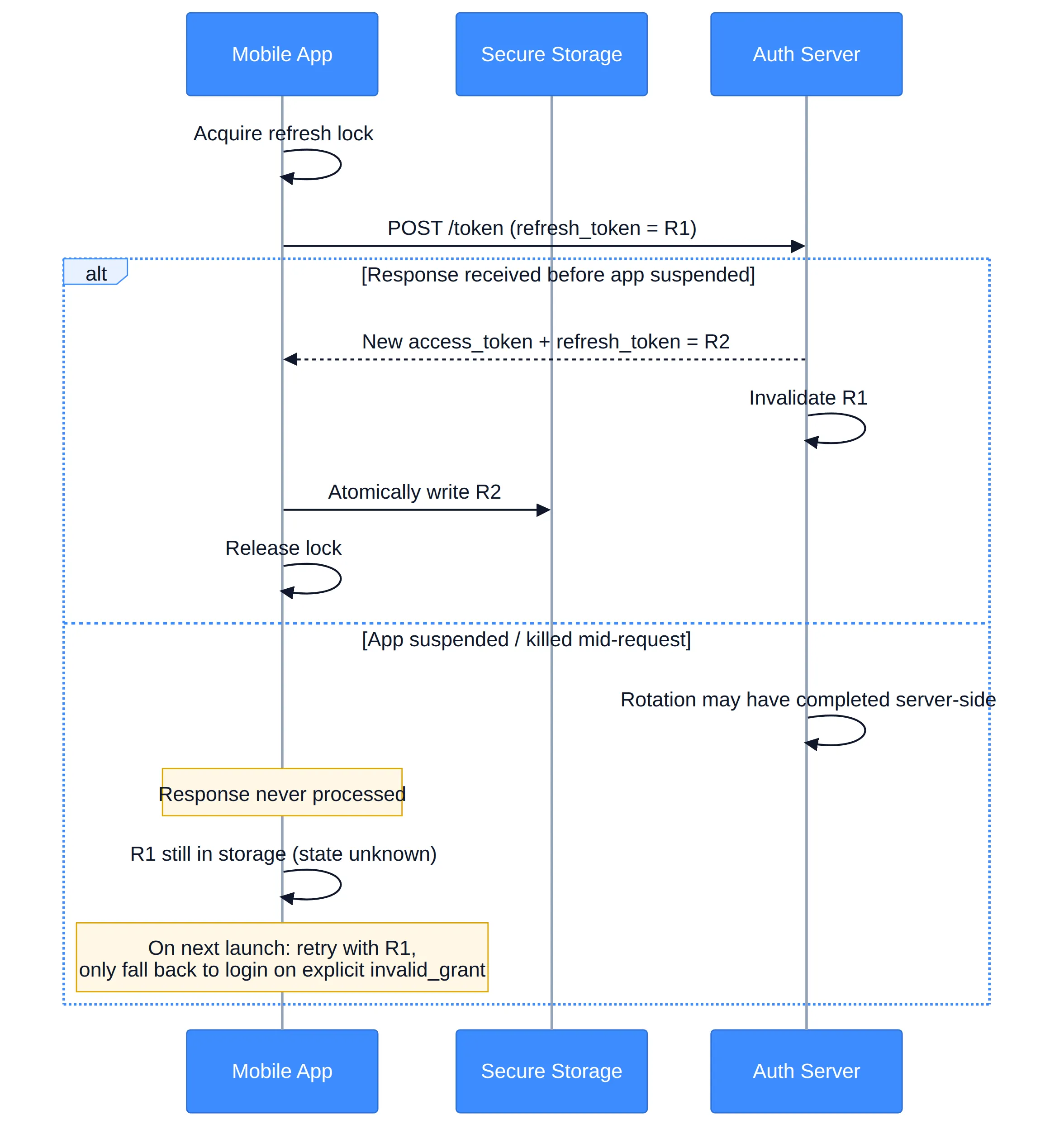
Mobile apps typically have a single process, but the races here come from a different source: background execution, network transitions (Wi-Fi to cellular), and the OS suspending or killing the app mid-request. A refresh can succeed server-side while the app never receives the response, because the process was terminated in the background before it could persist the new token.
The mitigations:
- A single-flight lock at the process level — same principle as the SPA case, but simpler since there’s usually one process, not many tabs. Guard the refresh call with a mutex/semaphore so concurrent requests (e.g., several API calls failing with 401 at once) share one refresh attempt.
- Treat “no response received” as ambiguous, not fatal. If a refresh request was sent but the app was suspended before a response arrived, don’t assume the old refresh token is dead — the request may not have gone through, or the response may not have been processed. On next launch, attempt a refresh with the last known token before falling back to a full login; only treat an explicit
invalid_grant/reuse error from the server as confirmation the token is gone. - Persist the new token atomically. Write the new refresh token to secure storage (Keychain / Keystore) only after confirming the full response was received and parsed, so a partial write can’t leave you holding a token that doesn’t match what the server has.
Traditional server-rendered applications (token in an HTTP-only cookie)
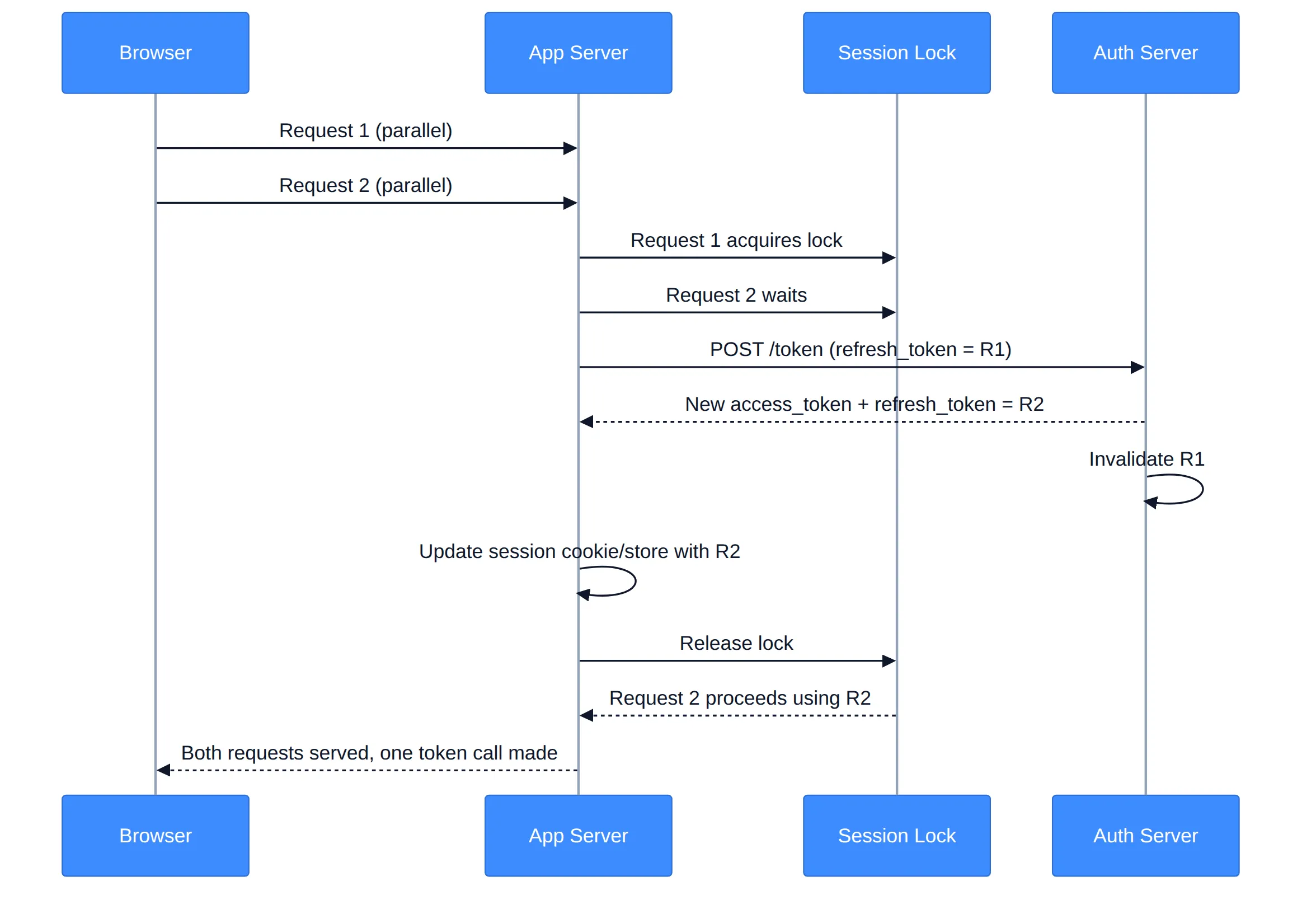
Here the refresh token typically lives server-side or in an HTTP-only cookie managed by your backend, not in client-side JavaScript. Races still happen, but the source is usually multiple simultaneous requests from the same browser session — a page with several parallel API calls, or a user double-clicking/double-submitting — each independently triggering a server-side refresh against the same session.
The mitigations:
- Serialize refresh at the session level, server-side. Use a per-session lock (a short-lived mutex in Redis, a database row lock, or an in-memory lock if you’re single-instance) so that if two requests for the same session both discover an expired access token, only one actually calls the authorization server; the other waits for that result and reuses it.
- Make the grace-period question a server-side config decision, not something every request has to reason about — this is the layer where it’s simplest to apply, since there’s one place (your backend) making refresh calls, not many independent clients.
- Handle concurrent requests from the same page load. A single page render that fires several backend calls in parallel can trigger the same race internally, even with only one browser tab. The session-level lock above covers this too, since it’s not tab-specific — it’s about not letting two requests hit the token endpoint for the same session concurrently.
Separate transient failure from confirmed invalidation
Across all three application types, one mistake causes more unnecessary logouts than anything else: treating every failed refresh call as proof the token is dead. Your error handling needs at least two branches:
- Transient (timeout, 5xx, dropped connection): retry with backoff, and don’t discard the refresh token. If the request never reached the server, or the response never came back, the token may still be valid.
- Terminal (
invalid_grant, an explicit reuse/expiry error from the provider): the token is confirmed dead. Only now clear local state and fall back to full re-authentication.
Fix: check whether your provider offers a reuse grace period
Alongside the application-level locking above, there’s a fix that lives entirely on the provider side and can reduce false positives with zero client-side changes: a reuse grace period. Some authorization servers soften rotation with a short grace window — instead of invalidating the previous refresh token the instant a new one is issued, they allow it to be reused for a few seconds and return the same new token pair rather than minting another one. This absorbs near-simultaneous requests without weakening the security model, since the window is short and the response is idempotent.
Support for this varies significantly by provider, and it’s often off by default. nacho.cerberauth.com/openid/providers tracks how different OpenID providers handle rotation and grace periods, so you can check whether yours supports it before building a client-side workaround for something the provider might already solve.
When it’s a genuine reuse event, not a race
Once you’ve ruled out the causes above, some reuse events will be real. When your client receives a confirmed reuse/invalid-grant error, don’t retry with the same token and don’t try to quietly recover the session — clear local token state and route the user to full re-authentication, in line with what RFC 9700 §4.14.2 describes as the expected outcome: the legitimate client is forced to obtain a fresh authorization grant. What exactly gets revoked on the server side (just that token, or a broader set) depends on your provider’s implementation — don’t assume a specific behavior your provider hasn’t documented.
Diagnostic checklist
If you’re chasing unexplained logouts on a system with rotation enabled:
- Reproduce it. Correlate logouts with multiple tabs, parallel requests, or poor network conditions — a strong sign you’re looking at a race, not an attack.
- Check for a single-flight lock appropriate to your architecture — client-side for SPA/mobile, session-level for server-rendered apps. This is very likely your root cause if missing.
- Check your provider’s grace period support at nacho.cerberauth.com/openid/providers — enabling it may resolve a large share of false positives with no client changes.
- Audit your error handling for the transient-vs-terminal distinction described above.
- For mobile: confirm you’re not discarding a possibly-still-valid token just because a response was never received.
- Confirm your re-authentication path is clean for the reuse events that are genuine — a clear redirect to login, not a silent failure or retry loop.
The takeaway
If rotation is causing logouts you can’t explain, the fix isn’t to weaken rotation — the security case for it, laid out in RFC 9700, is genuine, and the mechanism it describes is deliberately imprecise about attacker versus legitimate client for a reason: the server can’t always tell, and forcing re-authentication is the safe default. The fix is to build the coordination your architecture needs: a single-flight lock (browser-, process-, or session-scoped, depending on your app), a grace period where your provider supports it, and error handling that knows the difference between “the network failed” and “this token is dead.” Once that’s in place, the reuse events you see left over are the ones actually worth investigating.